Multiple Selfie Search for Better Accuracy
Multiple Selfie Search for Better Accuracy
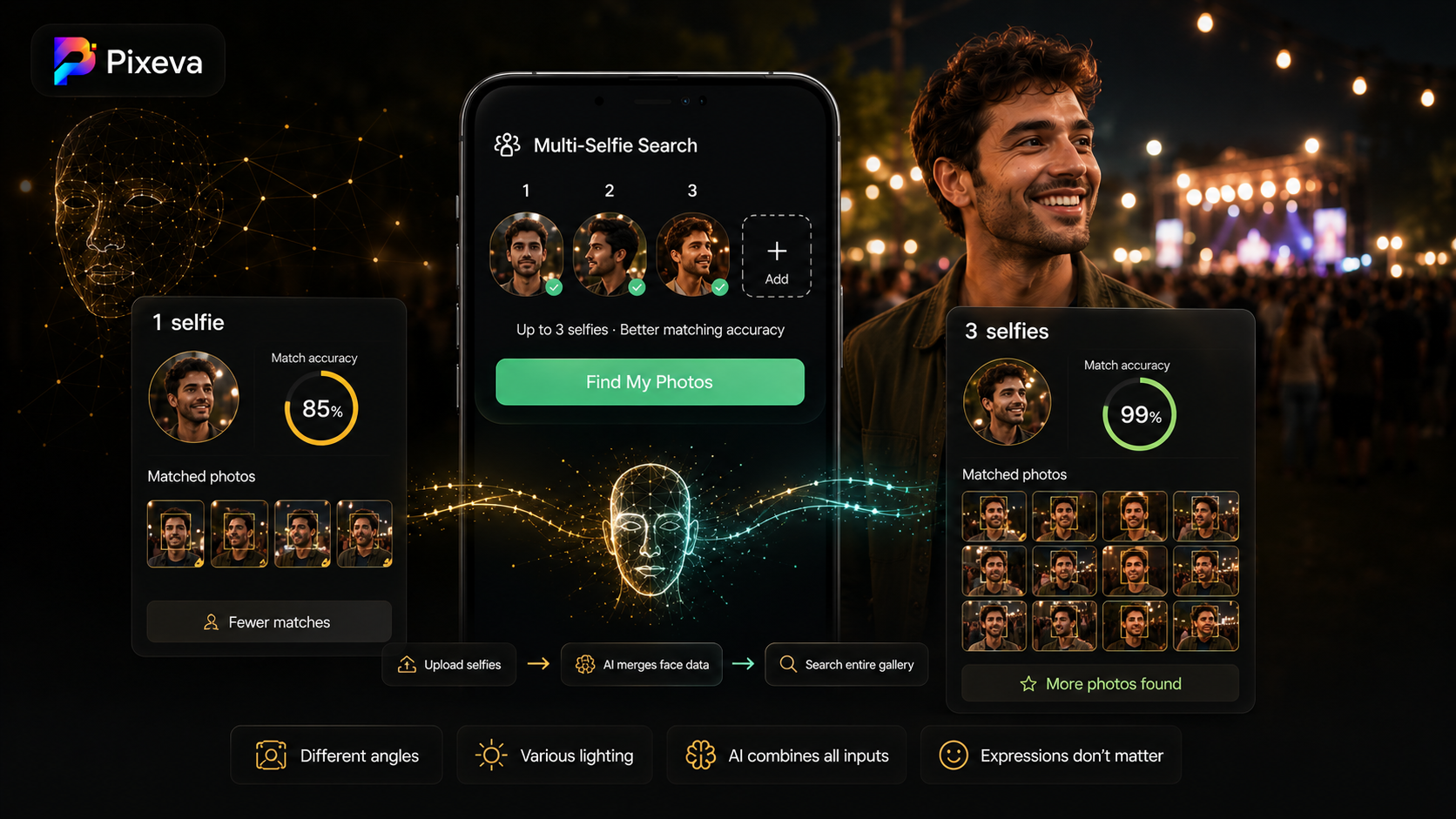
One selfie is a good start. Three selfies from different angles can be the difference between finding a handful of photos and finding almost every shot you appear in.
At big events—weddings, festivals, conferences—lighting changes, cameras move, and you turn your head. A single front-facing selfie does not always represent how you looked across the day.
Pixeva Multi-Selfie Search lets guests upload up to 3 selfies. The system runs face matching on each input and merges the results so you get a broader, smarter set of matches from the full gallery.
This guide explains why it works, how to use it, and how organizers can encourage guests to get better results.
What is multi-selfie search?
Multi-Selfie Search is a guest feature on your event gallery join page. Instead of one selfie:
- Guest uploads 1–3 selfies (different angles / lighting if possible)
- Pixeva searches the event collection using each selfie
- Matches are combined into one result set
- Guest sees more photos of themselves with stronger person-level confidence
Under the hood, Pixeva processes each selfie and aggregates matched faces and identity signals—so a side profile that one angle missed can still be found via another.
Why one selfie is not always enough
Different camera angles
A photographer shooting from the left captures your face differently than a guest snapping from the right. One selfie may not match every angle in the gallery.
Changing light
Outdoor ceremonies, indoor receptions, dance floors, and stage lights all change how your face reads to AI. A selfie taken in daylight helps match outdoor shots; an indoor selfie can help with evening photos.
Expressions and motion
Laughing, talking, dancing—your face shape shifts. Multiple references give the model more to work with.
Large galleries
When an event has hundreds or thousands of photos, small differences in similarity scores matter. Extra selfies can surface matches that sit just below the threshold for a single input.
How Pixeva combines multiple selfies
When a guest submits multiple images:
- Each selfie is processed through the same face search pipeline
- Matched face IDs from all selfies are merged (duplicates removed)
- Identity candidates are aggregated with combined confidence
- The guest receives a unified match list and a count of selfies processed
You do not need to pick which selfie was “best”—Pixeva handles the merge.
Guest tip: You will see messaging like “Found X photos using Y selfies” when multi-selfie mode is used.
Step-by-step: guest workflow
- Open the event gallery link (QR code, invite link, or shared URL).
- Choose upload selfie(s) or the multi-selfie flow when prompted.
- Add up to 3 selfies:
- Selfie 1: straight-on, good light
- Selfie 2: slight left or right turn
- Selfie 3: different lighting or expression (optional but helpful)
- Tap Find My Photos (or equivalent search action).
- Browse results; download or share favorites.
Optional: If you registered as an attendee, linking your search can help the organizer with analytics—follow the on-screen registration flow if offered.
Best practices (2–3 selfies)
| Tip | Why |
|---|---|
| Use 2–3 selfies, not 1 | Maximum allowed is 3—use the slots |
| Vary angle | Front + left/right profile |
| Vary lighting | One bright, one indoor if possible |
| Keep face unobstructed | Remove sunglasses/hats for at least one selfie |
| Recent photos | Hair/beard changes affect matching |
| Clear and in focus | Blurry selfies reduce match quality |
You do not need perfect passport photos—phone selfies are fine if the face is visible.
Single selfie vs multi-selfie (what to expect)
| 1 selfie | Up to 3 selfies | |
|---|---|---|
| Setup time | Fastest | +30 seconds |
| Angle coverage | One viewpoint | Multiple viewpoints |
| Typical result | Good for small galleries | Better for large, varied galleries |
| Best for | Quick try | “Find everything of me” |
Marketing teams sometimes illustrate this as more matches with more selfies. Your exact count depends on gallery size, photo quality, and how many photos you appear in—not a fixed percentage guarantee.
When multi-selfie helps most
- Weddings — all-day lighting, many photographers
- Conferences — badge photos, stage shots, networking candids
- Festivals & parties — harsh or colored lighting
- Sports & graduations — motion, helmets, caps in some shots
- Any event with 500+ photos — higher payoff from better coverage
Tips for organizers
Mention it in guest instructions
One line on signage or the welcome screen:
For best results, upload 2–3 selfies from different angles—we’ll find more of your photos.
Pair with QR codes
Multi-selfie only helps if guests reach the gallery. QR on tables, programs, or badges drives usage.
Set expectations at large events
First search may take a few seconds on huge galleries. Ask guests to wait for results before retrying.
Registration + search
If you use attendee registration, guests who register first may get a smoother path to search—check your event setup.
Rate limits
Multi-selfie search is heavier than single search (multiple AI calls per request). Guests who spam retries may hit rate limits. Encourage one thoughtful upload of 3 selfies instead of ten rapid retries.
Common questions
How many selfies can I upload?
Up to 3 per search in the guest UI}`.
Do all 3 need to be different?
Ideally yes—angle and lighting variation helps most.
Can I use old selfies from my camera roll?
Yes, if they look like you at the event (same hair, glasses, etc.).
Will makeup or filters break search?
Heavy filters can hurt accuracy. Use at least one natural, clear selfie.
Does it work without an app?
Yes—browser-based gallery on mobile or desktop.
Is multi-selfie required?
No. Single selfie still works; multi-selfie is for better coverage.
Troubleshooting
Few or no matches
- Add 2nd and 3rd selfies with different angles
- Remove hat/sunglasses in one photo
- Ensure you were photographed at the event
- Processing may still be running—check back later
“Maximum 3 selfies” message
You hit the upload cap—remove one and replace if needed.
Results feel wrong (someone else’s photos)
Use clearer selfies; try registration flow if identity disambiguation is enabled; contact the organizer.
Search failed / too many requests
Wait a minute and try again; avoid rapid repeated searches.
Multi-selfie and the rest of Pixeva
Strong guest journey:
- Find gallery (QR / link)
- Multi-selfie search → more of your photos
- Browse / albums → best moments
- Caption Magic (optional) → share on social
- Download → keep favorites
For organizers, analytics can include multi-selfie search activity—useful to see how guests engage with advanced search.
Conclusion
Face search is not magic—it is geometry, light, and statistics. Giving Pixeva multiple selfies is the easiest upgrade guests can make: a few extra seconds for many more photos found.
Tell your guests to upload 2–3 angles, not just one—and let the AI do the merging.
Try multi-selfie search on your next Pixeva event: (https://pixeva.co)
Keep exploring with Pixeva
Want to put this into practice? These pages go deeper: