AI-Generated Photo Captions for Social Media
AI-Generated Photo Captions for Social Media
You found the perfect event photo. You open Instagram. The caption box is empty.
Most people either skip posting or type something generic like "Great night!" That is a missed moment—for the guest and for the event brand.
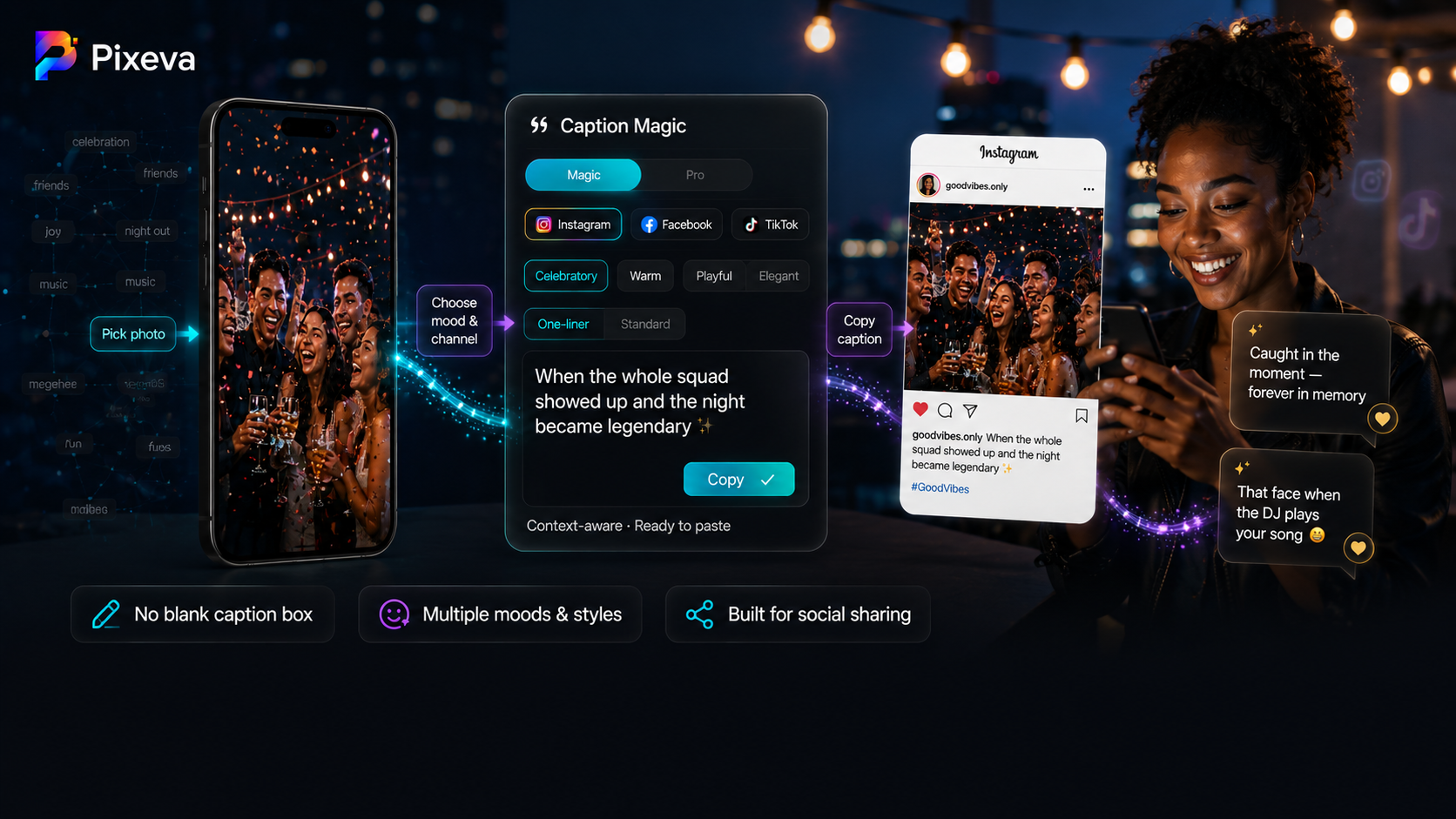
Caption Magic on Pixeva turns that blank box into a finished post: AI reads the photo, writes a caption for the platform you choose, and lets guests copy and paste in one tap.
This guide explains how it works, how to get better captions, and how organizers can use it to boost sharing without extra work.
Note: Caption limits per event depend on your plan (Free, Pro, Business, Event Pass). Organizers can turn guest captions on or off per event in settings. Confirm in your dashboard before publishing promises to clients.
What is Caption Magic?
Caption Magic is a guest-facing feature in the photo viewer. When someone opens a photo they want to share, they can:
- Open Caption Magic
- Choose channel (Instagram, Facebook, TikTok, LinkedIn, X, WhatsApp, and more)
- Pick mood and length
- Generate a caption grounded in what is actually in the image
- Copy and paste into their social app
There is no separate “caption app.” It lives where guests already are—your event gallery.
How the AI writes captions (under the hood)
Pixeva uses vision AI to understand the photo before writing. The model considers:
- What is happening (celebration, speech, group shot, candid laugh)
- Who is visible (without naming strangers inappropriately)
- Setting and mood (indoor/outdoor, formal vs casual)
- Your chosen channel (Instagram may allow light hashtags; X/TikTok stay shorter)
- Your chosen mood (celebratory, warm, playful, elegant, etc.)
Captions are cached for the same photo + settings so repeat requests are fast and consistent. Guests can regenerate for a fresh variation when the first line does not feel right.
Magic vs Pro
| Mode | Best for | What you do |
|---|---|---|
| Magic | Quick share | Pick channel, mood, length → generate |
| Pro | Specific voice | Add at least 5 characters of instruction (e.g. “mention the company offsite”, “no emojis”, “sound like a thank-you post”) |
Pro is ideal for corporate events, branded hashtags, or when marketing wants a consistent tone.
Length formats
- One-liner — Short, punchy line (great for Stories-style energy or quick posts)
- Standard — Fuller caption with a bit more context (great for Facebook or LinkedIn)
Channels like X and TikTok automatically steer toward shorter copy.
Mood options
| Mood | Typical tone |
|---|---|
| Auto | Matches what the photo feels like |
| Celebratory | Big moments, joy, energy |
| Warm | Heartfelt, genuine |
| Cool | Stylish, confident |
| Playful | Light humor (kind, not mean) |
| Nostalgic | “Remember this” memory vibe |
| Elegant | Polished, formal events |
| Minimal | Few words, high impact |
Why this matters for events
More organic reach
Every guest share is free marketing. Better captions → more engagement → more people discover your gallery.
Less friction for guests
Not everyone is a copywriter. Caption Magic removes the “I do not know what to write” barrier.
Brand-safe sharing
Organizers can disable captions per event (guest caption toggle) if an event should stay private or caption-free.
Works with the full Pixeva flow
Caption Magic sits after guests find themselves (face search) or browse albums. Strong stack:
- Upload / deliver photos
- Guest finds their shots
- Caption Magic → share on social
- (Optional) Your branding watermark on photos (see Day 20)
Step-by-step: guest workflow
- Open the event gallery link (no app install required).
- Find a photo (selfie search, albums, or browse).
- Open the photo viewer → tap Caption / Caption Magic.
- Select Magic or Pro.
- Choose channel (e.g. Instagram).
- Pick mood and One-liner or Standard.
- Tap generate → read → Copy.
- Paste into Instagram (or any app) and post.
Tip: Encourage guests to regenerate once if the first caption feels too formal or too silly—the second pass often nails the vibe.
Example captions (style inspiration)
These illustrate tone—not fixed templates. Real output depends on the photo.
Celebratory (wedding reception)
When the dance floor finally filled up and nobody wanted the night to end.
Warm (family gathering)
The kind of smile you only get when everyone you love is in the same room.
Playful (party)
That face when the DJ finally played your song.
Elegant (gala)
An evening of light, laughter, and moments worth keeping.
Minimal (conference)
Day two. Still learning. Still connecting.
Pro instruction example
Instruction: “Mention Acme Summit 2026, professional tone, one hashtag max.”
Output might reference the summit name and stay LinkedIn-appropriate.
Tips for organizers
Turn it on for share-heavy events
Weddings, festivals, brand activations, and conferences benefit most. For strict privacy events, leave guest captions off.
Tell guests in one line
On signage or the welcome screen:
Found your photos? Tap Caption Magic before you post—we’ll write the caption for you.
Pair with QR / gallery links
Caption Magic only helps if guests reach the gallery. Combine with QR codes on tables or badges (see your QR sharing guide).
Set expectations on limits
Free and paid tiers include different caption counts per event. If you expect heavy sharing, choose a plan that matches volume or upgrade before the event.
Do not fight the photo
The best captions come from clear, well-lit photos. Blurry or very dark images produce vaguer text—another reason to deliver quality uploads.
Tips for guests
- Match channel to platform — Pick Instagram when posting to Instagram so length and hashtags fit.
- Try Auto first — Then switch mood if you want funnier or more elegant.
- Use Pro for inside jokes — “Shout out to Table 7” or “mention Sarah’s speech” (keep instructions kind and appropriate).
- Edit after copy — AI gives a draft; you can tweak one word before posting.
- Regenerate — Same photo, new wording, same truth to the image.
Use cases
| Event type | Why Caption Magic helps |
|---|---|
| Weddings | Guests post candid moments with emotional captions |
| Conferences | Attendees share session photos on LinkedIn with professional tone |
| Brand activations | Pro mode injects campaign language |
| University / alumni | Nostalgic mood for reunion posts |
| Sports & nightlife | Celebratory or playful moods for high-energy shots |
Caption Magic vs writing captions yourself
| Manual | Caption Magic | |
|---|---|---|
| Time | Minutes per post | Seconds |
| Consistency | Varies by guest | Mood + channel rules |
| Accuracy to image | Depends on writer | Vision-led from photo |
| Best when | Highly custom brand copy only | Volume sharing at events |
Many guests still add a personal line after copying—that is fine. The feature removes the blank page problem.
Privacy and safety
- Captions are generated from guest-selected photos in your event.
- Pro instructions are screened for harmful content.
- Organizers control whether the feature is enabled per event.
- Guests choose what they ultimately post on social networks—Pixeva does not auto-post to Instagram for them.
Troubleshooting
“Caption limit reached”
The event has used its plan allowance for generated captions. Organizer may upgrade or guests share without Caption Magic for remaining posts.
Caption feels generic
Try a specific mood, switch to Pro with a short instruction, or regenerate.
Caption too long for X
Select X or TikTok as channel, or use One-liner length.
Button not visible
Organizer may have disabled guest captions for that event.
Pro mode asks for more text
Pro requires at least 5 characters of instruction—e.g. “funny but classy.”
Plan limits (reference)
Per-event caption generation counts vary by tier (check current pricing):
- Free: limited captions per event (e.g. 40)
- Pro: higher limit (e.g. 400)
- Business: typically unlimited
- Event Pass: mid-tier allowance (e.g. 80)
Numbers can change—verify on https://pixeva.co pricing before client contracts.
Conclusion
Social sharing is not just about having photos—it is about having words that match the moment. Caption Magic gives every guest a copywriter in their pocket, tuned for the platform and mood they want, without leaving your gallery.
Enable it for your next event, mention it in your guest instructions, and watch more photos leave the gallery as real posts—not drafts.
Try Caption Magic on your next Pixeva event: (https://pixeva.co)
Keep exploring with Pixeva
Want to put this into practice? These pages go deeper: